WHERE Statement
The WHERE statement is the fundamental filtering mechanism in SQL, enabling precise data extraction from tables by specifying exact criteria that records must satisfy.
It establishes conditional logic that determines which rows qualify for retrieval, transforming broad datasets into targeted, actionable information.
Syntax: SELECT * FROM table WHERE condition
WHERE Statement Construction
Start with SELECT
Begin your query with SELECT followed by the columns you want to retrieve, or use asterisk for all columns.
Specify the table
Use FROM followed by the table name to indicate which table contains the data you want to filter.
Add WHERE condition
Include the WHERE keyword followed by your condition that records must meet to be included in results.
Execute the query
Run your query to retrieve only the records that satisfy your specified condition criteria.
Common WHERE Operators Usage
Example
Let's examine a practical scenario using a basketball league database where we maintain comprehensive player records, including team affiliations and performance metrics. This type of structured data analysis is common across industries—from sports analytics to business intelligence reporting.
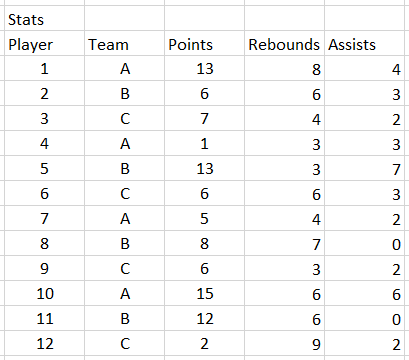
To demonstrate the WHERE statement's filtering capabilities, suppose we need to identify high-performing players who have scored more than 10 points. This type of query is essential for performance evaluation, roster decisions, and statistical analysis. We would construct the following SQL query:
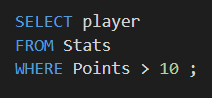
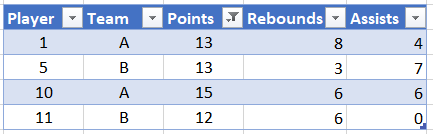
Executing this query filters our dataset to return only records meeting our specified criteria. The result demonstrates how WHERE statements transform raw data into meaningful insights:
Basketball League Example Breakdown
Table Structure
The basketball league database contains player records with team assignments and basic statistics including points scored per player.
Filter Condition
Using the condition for more than 10 points demonstrates numerical comparison filtering to identify high-performing players in the league.
WHERE Statement Best Practices
Ensure your condition values match the column data type for accurate comparisons
Database indexes on WHERE clause columns significantly improve query performance
Verify your WHERE conditions return expected results before running on production data
Group multiple conditions clearly when combining AND and OR operators
After running the basketball player query with the points condition, the result displays only players who scored more than 10 points, demonstrating effective data filtering.