ORDER BY
The ORDER BY keyword is a fundamental SQL clause that enables you to sort query results from your database tables in a meaningful sequence.
ORDER BY organizes data based on one or more specified columns, arranging records in either ascending (ASC) or descending (DESC) order to meet your analytical needs.
Syntax: SELECT * FROM table ORDER BY column_1 DESC ;
ORDER BY Syntax Breakdown
Start with SELECT
Begin your query with SELECT statement to specify which columns you want to retrieve from the database table.
Add FROM clause
Specify the table name using FROM keyword to indicate which table contains the data you want to sort.
Include ORDER BY
Add ORDER BY followed by the column name you want to sort by. This determines the sorting criteria for your results.
Specify Direction
Add DESC for descending order or leave blank for ascending. DESC shows highest values first, which is useful for rankings.
Ascending vs Descending Order
| Feature | ASC (Default) | DESC |
|---|---|---|
| Syntax | ORDER BY column | ORDER BY column DESC |
| Number Sort | 1, 2, 3, 4, 5 | 5, 4, 3, 2, 1 |
| Text Sort | A, B, C, D, E | Z, Y, X, W, V |
| Use Case | Chronological lists | Top performers, rankings |
Example
Understanding ORDER BY becomes clearer with a practical scenario. Consider you're managing a basketball league database that tracks player performance across multiple teams, including comprehensive statistics for strategic decision-making.
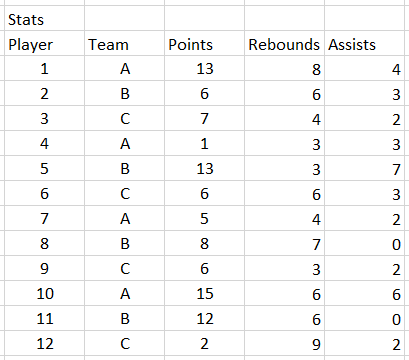
To identify your league's most dominant rebounders—crucial information for team managers and analysts—you'll need to query the database and sort by rebounding statistics. Here's how you structure that SQL query:
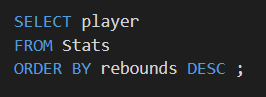
Executing this query transforms your raw data into actionable insights. The results clearly rank players by their rebounding performance:
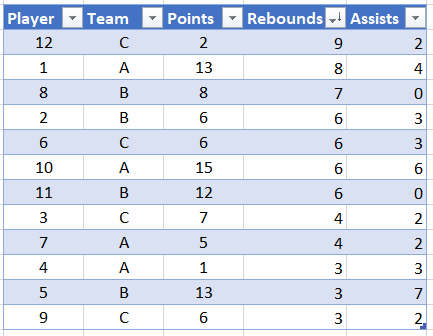
This example demonstrates using ORDER BY DESC to find top rebounders in a basketball league. The DESC keyword ensures players with the most rebounds appear first in the results.
Basketball Query Breakdown
Identify Goal
Determine that you want to find the top rebounders from player statistics in your basketball league database table.
Select Data
Use SELECT to choose all columns or specific columns like player name, team, and rebounding statistics from the players table.
Apply Sorting
Add ORDER BY with the rebounds column and DESC keyword to sort players from highest to lowest rebounding numbers.
Execute Query
Run the query to get results showing top rebounders first, making it easy to identify the best performers in this category.
ORDER BY Benefits and Considerations
ORDER BY Best Practices
The default ascending order may not match your analytical needs
Improves performance and focuses on most relevant records
Dramatically improves query performance on large tables
Different databases handle NULL values differently in ORDER BY