SELECT Statement
The SELECT statement forms the foundation of every SQL data retrieval operation, serving as the primary command that initiates your query and defines what information you want to extract from your database tables.
This powerful statement allows you to specify precisely which columns, calculations, or data transformations you want to retrieve, giving you granular control over your query results and optimizing performance by fetching only the data you actually need.
Syntax: SELECT * FROM table ;
SQL SELECT Query Structure
Start with SELECT keyword
Begin every data retrieval query with the SELECT statement to indicate you want to fetch data from the database.
Specify columns or use asterisk
List the specific column names you want to retrieve, or use * to select all available columns from the table.
Add FROM clause
Use the FROM keyword followed by the table name to specify which table contains the data you want to query.
Execute the query
Run the complete SQL statement to retrieve the requested data from the specified table columns.
SELECT Syntax Options
| Feature | SELECT * | SELECT specific_columns |
|---|---|---|
| Performance | Slower for large tables | Faster, optimized |
| Data Volume | Returns all columns | Returns only needed data |
| Best Practice | Use for exploration | Use in production |
| Readability | Quick but unclear intent | Clear and specific |
Example
To demonstrate the SELECT statement in action, let's examine a practical scenario from a basketball league database where we maintain comprehensive records of player information, team assignments, and performance statistics.
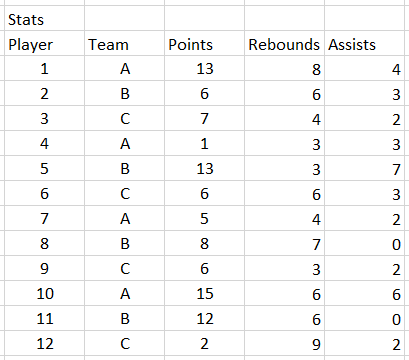
Suppose you need to generate a report showing only the player names and their corresponding team assignments. Rather than retrieving the entire dataset with all statistical columns, you can use a targeted SQL query to fetch exactly what you need:

This query explicitly requests only the player and team columns from the Stats table, demonstrating how SELECT statements help you avoid unnecessary data transfer and improve query performance. When you execute this command, the database engine processes your request and returns a clean, focused result set:
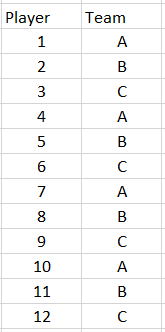
We are saying that we'd like to retrieve the player and team columns from the Stats table.Basketball Stats Database Structure
Player Column
Contains individual player names for identification. This is typically the primary way to reference each basketball player in the league.
Team Column
Shows which team each player belongs to. Essential for organizing players by their current team affiliation in the league.
Stats Table
The main table storing all basketball player information. Contains player details, team assignments, and performance statistics.
Selecting Specific Columns vs All Columns
SQL SELECT Best Practices
Improves query performance and makes intentions clear to other developers
Makes queries easier to read, debug, and maintain over time
Prevents accidentally running expensive operations on large production tables
Simplifies syntax and improves readability when working with multiple tables
Helps team members understand the business logic behind data retrieval operations