COUNT Function
The COUNT function returns the number of rows in a dataset that match your specified criteria, making it one of the most fundamental aggregate functions in SQL.
It provides an exact count of entries or records that satisfy your defined conditions, enabling precise data analysis and reporting.
Syntax: SELECT COUNT(column_1) FROM table WHERE condition ;
COUNT Function Syntax Breakdown
SELECT Statement
Begin with SELECT keyword followed by COUNT function to specify you want to count rows rather than retrieve actual data values.
Column Specification
Specify the column name within COUNT parentheses. Use COUNT(*) to count all rows or COUNT(column_name) for specific column.
FROM Clause
Indicate the source table using FROM keyword followed by the table name where you want to perform the count operation.
WHERE Condition
Add optional WHERE clause to filter rows based on specific criteria before counting. This narrows down your results.
COUNT Variations Comparison
| Feature | COUNT(*) | COUNT(column) |
|---|---|---|
| Null Values | Includes nulls | Excludes nulls |
| Performance | Faster | Slightly slower |
| Use Case | Total row count | Non-null entries |
Example
To illustrate how the COUNT function works in practice, let's examine a real-world scenario using a basketball league database that tracks player information, team assignments, and performance statistics.
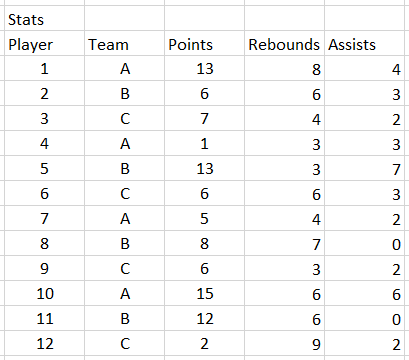
Suppose you need to determine roster sizes for budget planning or compliance verification. To find the exact number of players assigned to team C using a SQL query, you would execute the following command:
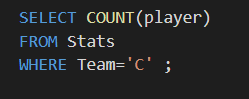
When you execute this query, the result returns 4, confirming that team C currently has four players on their roster. This type of query proves invaluable for team management, salary cap calculations, and ensuring league compliance with roster requirements. The COUNT function's reliability and speed make it essential for both ad-hoc analysis and automated reporting systems that modern sports organizations depend on for data-driven decision making.
The example uses a sports database containing player records, team assignments, and statistics to demonstrate practical COUNT function usage.
Team C Player Count Result
Query Execution Steps
Ensures accurate counting of records matching your criteria
Targets the right data source for your count operation
Narrows results to only players on the specified team
Runs the SQL statement and returns the count result
Confirms the query worked correctly and returned 4 players