Topics Covered in This Ruby on Rails Tutorial:
Master essential Rails console operations for professional development: exploring database contents, creating and editing objects programmatically, and implementing robust model validation to ensure data integrity.
Exercise Preview
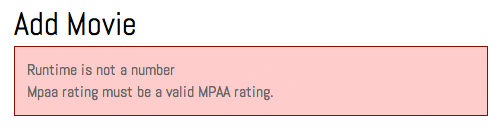
Photo courtesy of istockphoto, © Korhan Karacan, Image #15095805
Exercise Overview
Beyond the web interface that end users see, Rails provides an incredibly powerful development and debugging tool: the Rails console. This command-line interface combines the flexibility of Ruby's IRB with full access to your Rails application environment, including all models, methods, and database connections. For professional developers, the Rails console is indispensable for data manipulation, testing model behavior, debugging complex queries, and performing administrative tasks without building custom interfaces.
In modern Rails development (as of 2026), the console remains one of the most efficient tools for direct database interaction, especially when working with large datasets or performing one-off data migrations. You'll discover how to leverage this powerful tool to become a more efficient Rails developer.
If you completed the previous exercises, you can skip the following sidebar. We strongly recommend completing the previous exercises sequentially, as each builds upon concepts from the last. If you haven't finished them, follow the setup instructions below.
If You Did Not Do the Previous Exercises (3A–4C)
- Close any files you may have open in your editor.
- Open the Finder and navigate to Class Files > yourname-Rails Class
- Open Terminal.
- Type
cdand a single space (do NOT press Return yet). - Drag the yourname-Rails Class folder from the Finder to the Terminal window and press ENTER.
- Run
rm -rf flixto delete your existing copy of the Flix application. - Run
Git clone https://bitbucket.org/Noble Desktop/flix.Gitto download the complete Flix Git repository. - Type
cd flixto enter the project directory. - Type
Git checkout 4Cto synchronize your codebase to the end of the previous exercise. - Run
bundleto install all required Ruby gems and dependencies. - Run
yarn install—check-filesto install JavaScript dependencies and ensure asset compilation works correctly.
Getting Started
Let's prepare your development environment for console work. You'll need both the Rails server running and a separate console session active.
Close all files currently open in your code editor to start with a clean workspace.
Open the Finder and navigate to Class Files > yourname-Rails Class
Open Terminal.
Type
cdand a single space (do NOT press Return yet).Drag the flix folder from the Finder to the Terminal window.
Ensure Terminal is active and hit Return to navigate into the project directory.
Launch the Rails development server by typing:
rails serverKeep this server running throughout the exercise—it allows you to see changes reflected in the browser immediately.
Open a new Terminal tab by pressing Cmd–T to maintain your server connection.
In this new tab, launch the Rails console with:
rails consoleThe prompt should resemble IRB, but you now have access to your entire Rails application environment, including all models, controllers, and configuration.
Environment Setup Process
Navigate to Project Directory
Use Terminal to change into your Rails project folder using cd command and drag-drop functionality
Launch Rails Server
Execute 'rails server' command to start the development server on localhost:3000
Open Rails Console
Open new Terminal tab and run 'rails console' to access the interactive Rails environment
Exploring Database Contents in Rails Console
The Rails console provides direct access to your application's data layer, enabling you to view, search, update, and create records using the same ActiveRecord methods available in your controllers and models. This makes it an invaluable tool for data exploration, testing queries, and debugging database-related issues.
Begin by retrieving a specific movie record using its primary key. In the console, type:
movie = Movie.find(1)Notice that we use a simple variable name (
movie) rather than an instance variable (@movie) since we're working in a single console session rather than passing data between controller actions. We also don't need theparamshash—we can reference the ID directly.Observe the rich output that Rails console provides. You'll see the actual SQL query executed:
SELECT "movies".* FROM "movies" WHERE "movies"."id" = ? LIMIT 1 [["id", 1]]This transparency into the underlying SQL helps you understand exactly how ActiveRecord translates your Ruby code into database queries—knowledge that becomes crucial when optimizing application performance. Below the SQL, you'll see a complete dump of the movie object's attributes.
Access the stored object by simply referencing its variable name:
movieThe console will display the complete movie object again, demonstrating how variables persist within your console session.
Access specific attributes using Ruby's dot notation:
movie.titleThis should return
Text M for Murder. This direct attribute access works exactly as it would in your Rails application code.Combine ActiveRecord methods with Ruby string manipulation:
movie.description.upcaseThe console executes both the database query and the Ruby method, demonstrating how seamlessly ActiveRecord integrates with Ruby's built-in functionality.
Search for records using attributes other than the primary key:
Movie.find_by title: "The Typographer's Wife"The
find_bymethod returns the first record matching your criteria, ornilif no match exists. This is safer thanfindwhen you're uncertain whether a record exists.Perform multi-field searches by combining criteria:
Movie.find_by(placement: "in_theaters", mpaa_rating: "PG")Parentheses are optional for single-criteria searches but recommended for multi-field queries to improve readability. This query should return
Gone With the Windows. For queries expecting multiple results, we use thewheremethod instead offind_by.Execute more complex queries that return multiple records:
Movie.where("created_at > ?", 1.year.ago)This query demonstrates Rails' parameterized query syntax. The question mark acts as a placeholder that Rails safely replaces with the provided value (
1.year.ago). This approach prevents SQL injection attacks—a critical security consideration when building production applications.SQL injection remains one of the most dangerous vulnerabilities in web applications. When user input directly constructs SQL queries without proper sanitization, malicious users can execute arbitrary database commands. Rails' parameterized queries automatically escape values, protecting your application from these attacks.
Compare
wherewithfind_byfor the same criteria:Movie.find_by("created_at > ?", 1.year.ago)While
wherereturns all matching records,find_byreturns only the first match. Choose the method that matches your expected result set.Store query results in variables for further manipulation:
movies = Movie.where("created_at > ?", 1.year.ago)Assigning results to variables enables you to perform additional operations on the dataset without re-querying the database.
Examine the size of your result set:
movies.countThis returns
4, indicating four records match your criteria. Thecountmethod is efficient—it executes a SQL COUNT query rather than loading all records into memory.Access the first record in your collection:
movies.firstThis retrieves
Text M for Murder. Thefirstmethod is optimized to limit the SQL query, fetching only the record you need.Retrieve the last record:
movies.lastThis returns
Gone With the Windows. Note thatlastdetermines ordering based on your database's default sort or any explicit ordering you've applied.Access records by array-style indexing:
movies[2]This retrieves the movie with
id: 3. Remember that array indexing starts at zero, so[2]accesses the third record in the collection.Process multiple records using Ruby blocks:
movies.each do |movie|
   puts movie.title.upcase
end
This demonstrates the power of combining ActiveRecord collections with Ruby's enumeration methods. The console outputs each movie title in uppercase, followed by the method's return value. This pattern is fundamental to Rails development—treating database results as Ruby collections enables sophisticated data processing with minimal code.
Rails automatically uses placeholder techniques with question marks to protect against SQL injection attacks. This security feature is built into Rails query methods and helps prevent malicious SQL execution.
Console vs Controller Syntax
| Feature | Rails Console | Controller File |
|---|---|---|
| Finding Records | Movie.find(1) | Movie.find(params[:id]) |
| Variable Assignment | movie = Movie.find(1) | @movie = Movie.find(params[:id]) |
| Instance Variables | Not required | Required with @ symbol |
Adding an Object in Rails Console
Beyond querying existing data, the Rails console excels at creating and manipulating records. This capability proves invaluable for testing model behavior, seeding development data, and performing administrative tasks. Let's explore how to create new records programmatically.
Initialize a new, empty movie object:
movie = Movie.newThis creates an unsaved instance with default values—the same pattern used in your
newaction when displaying forms to users.Examine the newly created object's attributes. Notice that all values are
nilinitially—the object exists in memory but hasn't been persisted to the database.Assign a title to your new movie:
movie.title = "Will Code for Brains"This sets the attribute value but doesn't save it to the database yet—you have full control over when persistence occurs.
Retrieve prepared content for our new movie. Switch to the Finder.
Navigate to Class Files > yourname-Rails Class > flix snippets and open will_code_for_brains.txt.
Copy the Description paragraph from the file.
Return to the Terminal and set the description:
movie.description = "…"Replace the ellipsis with the copied description text.
Continue populating the movie's attributes:
movie.placement = "go_now"
movie.mpaa_rating = "R"
movie.poster_image = "willcodeforbrains-2x.jpg"
movie.runtime = 82
Notice that
runtimeis an integer, so it doesn't require quotation marks. Paying attention to data types prevents common errors and ensures your application handles data correctly.Set the subtitle preference:
movie.has_subtitles = falseWhen setting boolean values, omit the question mark suffix used for reading boolean attributes. Also,
falseis a boolean literal, not a string, so don't enclose it in quotes.Complete the remaining attributes:
movie.ticket_price = 10.25
movie.release_date = "2021-10-31"
movie.director = "Rome Giorgio"
Note the mix of data types:
ticket_priceis a decimal,release_dateis a string that Rails will convert to a date, anddirectoris a string.Persist your new movie to the database:
movie.saveThe console displays the generated SQL INSERT statement. Rails automatically handles the complex SQL generation, parameter binding, and transaction management. Notice the extensive use of parameterized queries—Rails consistently protects against SQL injection, even in code you don't directly control.
Verify your new movie appears in the application. Open your browser.
Navigate to localhost:3000 and confirm that Will Code for Brains appears on the main page.
This demonstrates Rails' flexibility—data created through the console integrates seamlessly with your web interface. Whether data comes from HTML forms, console commands, database seeds, or API calls, Rails treats it uniformly through the ActiveRecord layer.
Now let's explore editing existing records. Suppose the MPAA has reclassified Gone With the Windows from PG to G—we can make this change directly through the console.
Creating New Movie Record
Initialize New Object
Use Movie.new to create empty movie object with all nil values
Assign Field Values
Set title, description, placement, rating, and other string/integer/boolean fields
Save to Database
Execute movie.save to persist the record and generate SQL insert statements
Remember that runtime is an integer (no quotes), has_subtitles is boolean (no quotes), while strings like title and description require quotation marks. Rails is flexible about data entry methods.
Editing an Object in Rails Console
Modifying existing records through the console follows the same pattern as creation: find the record, modify its attributes, then save the changes. This workflow is essential for data maintenance, testing updates, and resolving data issues in development.
Locate the movie you want to edit. In Terminal, type:
movie = Movie.find_by(title: "Gone With the Windows")Remember that
find_byis case-sensitive—the title must match exactly, including capitalization and punctuation.Verify the current MPAA rating:
movie.mpaa_ratingThe console should display
PG. This verification step is good practice—always confirm you're working with the expected data before making changes.Update the rating to the new value:
movie.mpaa_rating = "G"The console confirms the change by displaying
G, but this modification exists only in memory.Check whether the change appears in your application. Switch to your browser, navigate to localhost:3000/movies/4 and observe that the rating hasn't changed yet.
This demonstrates an important Rails concept: attribute changes aren't automatically persisted. You must explicitly save modifications to make them permanent.
Return to Terminal and save your changes:
movie.saveNow the change is permanently stored in the database. Refresh your browser to see the updated rating.
Explore Rails' shortcut for creating records in a single operation:
Movie.create(title: "The Friendly Alien")The
createmethod combinesnewandsave, immediately persisting the record. However, since we only provided a title, most attributes remainnil.Observe how incomplete records can cause application errors. Switch to your browser, navigate to localhost:3000/movies and notice the error page.
This incomplete record breaks our movie listing because essential fields like
poster_imageare missing. In production applications, such data integrity issues can cause serious problems, highlighting the importance of proper validation.Clean up the problematic record. Return to Terminal and execute:
Movie.find_by(title: "The Friendly Alien").destroyThis demonstrates method chaining—Rails executes
find_byfirst, then callsdestroyon the returned object. The console shows the generated DELETE SQL statement.Verify the fix by refreshing localhost:3000/movies in your browser. The page should load correctly with The Friendly Alien removed.
This incident illustrates why robust data validation is crucial. Rails makes it straightforward to add validation rules that prevent incomplete or invalid records from being saved.
Exit the Rails console to prepare for the validation section:
exitClose the Terminal tab containing the console session, keeping your server running in the other tab.
Changes made to object attributes in Rails console are not automatically saved to the database. You must explicitly call the save method to persist modifications.
Console Operation Methods
Create Method
Movie.create combines new and save operations into single action, immediately persisting the record to database.
Destroy Method
Can be chained directly onto find_by commands to locate and delete records in one operation.
Method Chaining
Rails allows chaining operations like Movie.find_by(title: name).destroy for efficient command execution.
Adding Basic Validation to a Model
The data integrity issues we just experienced underscore the importance of model validation. Rails provides a comprehensive validation framework that ensures data meets your application's requirements before being saved. These validations run automatically whenever records are created or updated, whether through web forms, console commands, or programmatic operations.
Switch to your code editor to implement validation rules.
If your editor supports project-wide file access (like Visual Studio Code or Sublime Text), open the entire flix folder for easier navigation.
Open flix > app > models > movie.rb
Model files are where you define validation rules, business logic, and relationships. The validation system we're about to implement will prevent the data integrity issues we encountered earlier.
Add presence validations for essential fields:
class Movie < ApplicationRecord
   validates :title, :mpaa_rating, :runtime, :poster_image, presence: true
end
The
presence: truevalidation ensures these four fields contain values before a record can be saved. This prevents the empty-field issues that broke our movie listing.Add a data type validation for the runtime field:
class Movie < ApplicationRecord
   validates :title, :mpaa_rating, :runtime, :poster_image, presence: true
   validates :runtime, numericality: true
end
The
numericality: truevalidation ensures that runtime values are numeric, preventing text input that could cause calculation errors or display issues.Implement a constraint validation for the MPAA rating:
class Movie < ApplicationRecord
   validates :title, :mpaa_rating, :runtime, :poster_image, presence: true
   validates :runtime, numericality: true
   validates :mpaa_rating, inclusion: { in: ["G", "PG", "R"] }
Note that we've intentionally omitted "NR" from the allowed values array. This creates a test case to verify our validation system works correctly.
Save the model file to activate your validation rules.
Test the validation system with invalid data. Switch to your browser, navigate to localhost:3000/movies/new and submit a completely blank form.
The form submission should fail (no redirect to the index page, no success message), but you won't see error messages yet. The validations are working—Rails prevented the invalid record from being saved—but we haven't implemented the user interface to display validation errors.
When validation fails, Rails populates an
errorscollection on the model object. These errors exist in@movie.errorsbut remain invisible to users until we explicitly display them in our template.Implement error message display. Return to your code editor.
Open flix > app > views > movies > _form.html.erb
Add conditional error display logic at the top of the form:
<% if @movie.errors.count > 0 %>

<% end %>
<%= form_with model: @movie do |f| %>
This ERB conditional checks whether any validation errors exist on the movie object. If errors are present, we'll display them to the user.
Add HTML structure for error messages:
<% if @movie.errors.count > 0 %>
   <div id="flash" class="alert">

   </div>
<% end %>
The
alertclass will style our error messages consistently with other application notifications.Insert code to format and display all error messages:
<div id="flash" class="alert">
   <%= @movie.errors.full_messages.collect { |msg| msg }.join("<br>").html_safe %>
</div>
This code retrieves all validation error messages, joins them with HTML line breaks, and marks the output as HTML-safe so Rails renders the breaks correctly. The
full_messagesmethod provides user-friendly error descriptions that include the field name and validation requirement.
With these validations in place, your Rails application now enforces data integrity at the model level, preventing incomplete or invalid records regardless of how they're created. This robust foundation protects your application's data quality and provides clear feedback to users when their input doesn't meet requirements.
The Rails console, combined with proper validation, gives you powerful tools for both development and production data management while maintaining the data quality standards essential for professional applications.
Model Validation Implementation
Ensures title, mpaa_rating, runtime, and poster_image fields exist before saving
Validates that runtime field contains only numeric values
Restricts MPAA rating to specific allowed values in predefined array
Add error handling logic to form template for user feedback
Rails stores validation errors in @movie.errors but doesn't automatically display them. Custom template logic using full_messages.collect and html_safe methods is required to show errors to users.