Topics Covered in This Ruby on Rails Tutorial:
Creating a Model Method for Runtime, Scopes, Optional Bonus: DRYing up the Scopes, Additional Bonus: Adding the Tab Highlight Behavior
Exercise Preview
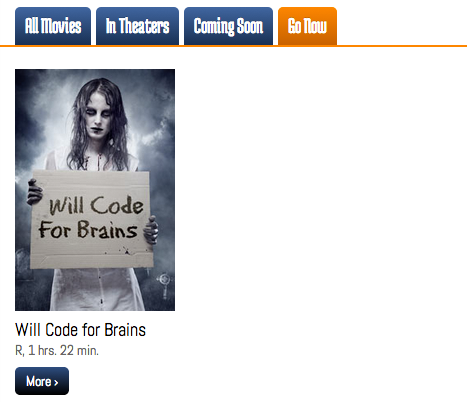
Photo courtesy of istockphoto, © Bliznetsov, Image #20982716
Prerequisites Setup Process
Navigate to Project Directory
Open Terminal and navigate to your Rails class folder using cd command with drag-and-drop functionality
Clone Repository
Run Git clone command to copy the Flix repository from Bitbucket for the exercise foundation
Install Dependencies
Execute bundle and yarn install commands to set up all required gems and JavaScript dependencies
Exercise Overview
If you've been working through Rails validations, you've likely noticed your movie.rb model file sitting mostly empty, practically begging for more functionality. This is where model methods come into play—powerful tools that encapsulate business logic directly where it belongs: in your models.
The Rails community champions a fundamental principle: "fat model, skinny controller." This architectural pattern advocates placing the bulk of your application's logic in models rather than controllers or views. Why? Model code is inherently more reusable and testable than controller code, leading to better maintainability and adherence to DRY principles. By 2026, this approach has proven essential for scaling Rails applications effectively.
If you completed the previous exercises, you can skip the following sidebar. We recommend you finish the previous exercises before starting this one. If you haven't finished them, do the following sidebar.
If You Did Not Do the Previous Exercises (3A–4D)
- Close any files you may have open.
- Open the Finder and navigate to Class Files > yourname-Rails Class
- Open Terminal.
- Type
cdand a single space (do NOT press Return yet). - Drag the yourname-Rails Class folder from the Finder to the Terminal window and press ENTER.
- Run
rm -rf flixto delete your copy of the Flix site. - Run
git clone https://bitbucket.org/Noble Desktop/flix.gitto copy the Flix Git repository. - Type
cd flixto enter the new directory. - Type
git checkout 4Dto bring the site up to the end of the previous exercise. - Run
bundle installto install any necessary gems. - Run
yarn install --check-filesto install JavaScript dependencies.
Getting Started
Let's set up your development environment and dive into creating meaningful model methods that will enhance your application's user experience.
Open the Finder and navigate to Class Files > yourname-Rails Class
Open Terminal.
Type
cdand a single space (do NOT press Return yet).Drag the flix folder from the Finder to the Terminal window.
Make sure you're in Terminal and hit Return to change into the new folder.
Type the following in Terminal:
rails serverThe Rails server is now running. With your development environment ready, let's explore how model methods can transform raw data into user-friendly information.
Creating a Model Method for Runtime
Your Flix site currently displays movie runtimes in minutes—but let's be honest, who wants to mentally calculate that 238 minutes equals nearly 4 hours? This presents a perfect opportunity to create a model method that transforms this raw data into a more intuitive format. User experience improvements like this may seem small, but they significantly impact how users interact with your application.
We recommend opening the flix folder in your code editor if it supports project-wide file access (like VS Code, Sublime Text, or RubyMine).
In your code editor, open flix > app > models > movie.rb
Let's add a new method to the model file. Type the following above the last
end:def runtime_hours unless runtime.nil? endWe're creating
runtime_hoursas a distinct method name sinceruntimealready exists as a database attribute. Theunlessguard clause is crucial here—it prevents errors when a movie record lacks runtime data, which would otherwise crash the entire page. This defensive programming practice is essential in production applications.Add the following bold code to the
unlessstatement:unless runtime.nil? "#{runtime / 60} hrs." endHere's a key Rails behavior to understand: when Rails performs integer division using /, it completely discards the remainder. This behavior differs from some other languages and is exactly what we need for extracting whole hours. Next, we'll use the modulus operator (%) to capture those remaining minutes.
Add the following bold code to complete the time formatting:
"#{runtime / 60} hrs. #{runtime % 60} min."The modulus operator produces only the remainder of the division equation, giving us the leftover minutes after extracting the hours. This combination provides a clean, readable time format.
Save the file.
Open app > views > movies > index.html.erb
Find the following code, around line 22:
<div><%= movie.mpaa_rating %>, <%= movie.runtime %> minutes</div>Edit the line as shown below, removing the word
minutessince ourruntime_hoursmethod now includes the units:<div><%= movie.mpaa_rating %>, <%= movie.runtime %></div>Update the code to use our new method:
<div><%= movie.mpaa_rating %>, <%= movie.runtime_hours %></div>Save the file.
We need to apply the same change to the movie detail view. Open app > views > movies > show.html.erb
Find the following piece of code, around line 8:
<p class="runtime">Runtime: <%= @movie.runtime %> minutes </p>Update the code to use our enhanced method, removing the redundant
minutestext:<p class="runtime">Runtime: <%= @movie.runtime_hours %></p>Save the file.
Switch to your browser, navigate to localhost:3000 and observe how all runtimes now display in the much more user-friendly hours and minutes format!
This transformation demonstrates the power of model methods—we've improved the user experience across the entire application by changing code in just one place. Now let's explore how we can further clean up our codebase by centralizing MPAA rating logic.
When Rails divides using the forward slash operator, it completely discards the remainder. Use the modulus operator (%) to capture only the remainder for minutes calculation.
Runtime Display Comparison
| Feature | Before | After |
|---|---|---|
| Display Format | 238 minutes | 3 hrs. 58 min. |
| User Friendliness | Requires calculation | Immediately readable |
| Code Location | View template | Model method |
DRYing up the Code with Another Model Method
You may have noticed MPAA ratings scattered throughout different parts of your application—including controller code where business logic doesn't really belong. Let's consolidate this data using a class method, demonstrating how proper Rails architecture keeps related data organized in the model layer.
In your code editor, open app > views > movies >
_form.html.erbFind the following code, around line 41:
<% mpaa_ratings = options_for_select ["G", "PG", "R", "NR"], selected: @movie.mpaa_rating %>Select and cut the MPAA ratings array (Cmd–X or Ctrl–X):
["G", "PG", "R", "NR"]The remaining code should look like this:
<% mpaa_ratings = options_for_select(, selected: @movie.mpaa_rating) %>Replace the removed array with a call to the class method we're about to create:
<% mpaa_ratings = options_for_select(Movie.all_mpaa_ratings, selected: @movie.mpaa_rating) %>Notice how class methods always start with the class name itself—this is a fundamental Ruby convention that makes the code more readable and maintainable.
Save the file.
Switch to movie.rb in your code editor.
Add the following bold code above the mpaa_rating validation method:
def self.all_mpaa_ratings

end

validates :mpaa_rating, inclusion: { in: self.all_mpaa_ratings }
The
selfkeyword is crucial here because we're creating a class method rather than an instance method. Since MPAA ratings are universal constants that apply to all movies (not specific to individual movie instances), a class method is the appropriate choice. We can invoke this method withMovie.all_mpaa_ratingswithout needing a particular movie instance.Notice that this method must be defined above the validation that uses it—Ruby needs the method to exist before it can be referenced in the validation logic.
Add the MPAA ratings array to complete the method:
def self.all_mpaa_ratings
   ["G", "PG", "R", "NR"]
end
This centralization means any future changes to MPAA ratings (like adding new categories) only require updates in one location.
Let's use Ruby's more elegant array syntax for simple strings:
def self.all_mpaa_ratings
   %w(G PG R NR)
end
The
%w()syntax is a Ruby shorthand for creating arrays of strings without quotes or commas. It only works with simple strings that don't contain spaces, making it perfect for our use case.
Use class methods (with self) when data is common to all instances. The MPAA ratings list is the same for every movie, making it perfect for a class method invoked as Movie.all_mpaa_ratings.
Ruby Array Syntax Options
Traditional Syntax
Standard array notation using square brackets and quoted strings: ['G', 'PG', 'R', 'NR']
Word Array Syntax
Simplified Ruby syntax using %w for simple strings without spaces: %w(G PG R NR)
Scopes
Now that you've mastered model methods, let's explore scopes—another powerful Rails feature for adding logic to your models. Scopes provide an elegant, chainable way to filter records based on specific criteria, making complex queries both readable and reusable. In modern Rails development, scopes are essential for building sophisticated data filtering systems.
In your browser, navigate to localhost:3000 and try clicking the tabs labeled All Movies, In Theaters, Coming Soon, and Go Now. Currently, these tabs lack functionality—but scopes will change that dramatically!
Your database already includes a placement field that categorizes each movie's current status. We'll create scopes to filter movies by this field and add controller logic to route requests appropriately. This pattern is commonly used in production applications for creating dynamic, filtered views.
Switch to your code editor.
Open flix > config > routes.rb
On line 4, define a new parameterized route:
get 'movies/recommended/:placement' => 'movies#recommended'
resources :movies
This route captures the
:placementparameter from the URL and passes it to therecommendedaction in the movies controller. This RESTful approach allows for clean, bookmarkable URLs.Save the file.
Open app > controllers > movies_controller.rb
Add the following method around line 11 (placement doesn't matter as long as it's above the private keyword):
def recommended
   @placement = params[:placement]
end
We're storing the placement parameter in an instance variable for potential use in the view—perhaps for displaying the current filter or for conditional logic.
Expand the method to handle different placement categories with a case statement:
def recommended
   @placement = params[:placement]
   case @placement
      when 'in_theaters'
      when 'coming_soon'
      when 'go_now'
   end
   render 'index'
end
Rather than creating a separate view file, we're reusing the existing index view with the
render 'index'command. This demonstrates the DRY principle—why duplicate HTML when our index view already knows how to display a collection of movies? The case statement structure prepares us for the scope logic we'll add next.Save the file.
Switch to movie.rb to create our scopes.
Add the scope definition around line 6:
validate :mpaa_rating_must_be_in_list

scope :in_theaters,

def runtime_hours
Scope definitions always begin with the
scopekeyword followed by the scope name. This creates a chainable method that can be combined with other ActiveRecord methods.Complete the scope with lambda syntax and a where clause:
scope :in_theaters, -> { where(placement: 'in_theaters') }The
->symbol creates a lambda (anonymous function) that defers execution until the scope is actually called. Thewheremethod generates SQL to find movies with the specified placement value. This approach is both efficient and readable.Create the remaining scopes by duplicating this line three times (in Sublime Text, use Cmd–Shift–D):
scope :in_theaters, -> { where(placement: 'in_theaters') }
scope :in_theaters, -> { where(placement: 'in_theaters') }
scope :in_theaters, -> { where(placement: 'in_theaters') }
Update the duplicated scopes for the other placement categories:
scope :in_theaters, -> { where(placement: 'in_theaters') }
scope :coming_soon, -> { where(placement: 'coming_soon') }
scope :go_now, -> { where(placement: 'go_now') }
These scopes are now ready to be called as class methods, like
Movie.in_theatersorMovie.coming_soon.Save the file.
Switch back to movies_controller.rb to connect the scopes to our controller logic.
Complete the case statement by calling the appropriate scope for each placement:
@placement = params[:placement]
case @placement
   when 'in_theaters'
      @movies = Movie.in_theaters
   when 'coming_soon'
      @movies = Movie.coming_soon
   when 'go_now'
      @movies = Movie.go_now
end
render 'index'
This controller logic demonstrates the beauty of scopes—clean, readable code that clearly expresses intent. The
@moviesinstance variable will contain only the filtered results, which the index view will display seamlessly.Save the file.
Now let's make the navigation tabs functional. Switch to index.html.erb
Find the tab HTML code around line 7:
<li class="active"><a href="#">All Movies</a></li>
<li><a href="#">In Theaters</a></li>
<li><a href="#">Coming Soon</a></li>
<li><a href="#">Go Now</a></li>
Remove the placeholder anchor tags:
<li class="active">All Movies</li>
<li>In Theaters</li>
<li>Coming Soon</li>
<li>Go Now</li>
Remove the hardcoded active class since we'll implement dynamic highlighting:
<li>All Movies</li>Add the Rails link helper for the All Movies tab:
<li><%= link_to "All Movies", movies_path %></li>The
link_tohelper is Rails' preferred way to generate links. Themovies_pathmethod is Rails magic—it automatically generates the correct path (/movies) based on your routes. You can see all available path helpers by runningrails routesin your terminal.Complete the remaining navigation links:
<li><%= link_to "All Movies", movies_path %></li>
<li><%= link_to "In Theaters", "/movies/recommended/in_theaters" %></li>
<li><%= link_to "Coming Soon", "/movies/recommended/coming_soon" %></li>
<li><%= link_to "Go Now", "/movies/recommended/go_now" %></li>
Since we don't have named route helpers for our custom recommended paths, we're using the explicit URL strings. In a production application, you might consider adding
as:options to your routes for cleaner path helpers.Save the file.
Test your implementation! Switch to your browser, navigate to localhost:3000/movies and click each tab. You should see different movie collections based on their placement values. This filtering system demonstrates how scopes can dramatically enhance user experience with minimal code.
Notice how the index view adapts seamlessly to display different movie collections—this is MVC architecture working in harmony.
Take a moment to examine how the index view works. Switch back to index.html.erb in your code editor.
The view is written generically—it simply expects an
@moviesinstance variable containing movie objects, as seen in line 15:<% @movies.each do |movie| %>This design pattern makes the view highly reusable. It doesn't care whether
@moviescontains all movies or a filtered subset—as long as each object responds to movie methods, everything works perfectly.Examine the controller methods to understand the data flow. Switch to movies_controller.rb and look at the index method around line 7:
def index
   @movies = Movie.all
end
Compare this with the
recommendedmethod we just created. Both methods set@movies, but with different data sets. This demonstrates separation of concerns—the controller determines what data to display, while the view handles how to display it.Stop the Rails server by pressing Ctrl–C in Terminal.
Implementing Scope Functionality
Define Routes
Add route definition in routes.rb to handle placement parameters for movie categorization
Create Controller Action
Build recommended method in movies controller with case statement for different placement values
Write Scope Definitions
Define scopes in movie model using lambda syntax and where clauses for database filtering
Update View Templates
Modify index view to include functional navigation links using Rails link_to helper
The view expects an @movies instance variable containing movie objects. It doesn't care whether @movies contains all movies or a subset - the controller decides which collection to display. This demonstrates MVC working in harmony.
Optional Bonus: DRYing up the Scopes
While our current implementation works perfectly, experienced Rails developers always look for opportunities to eliminate duplication. Our three scopes follow an identical pattern—let's consolidate them into a more maintainable solution that demonstrates advanced Rails techniques.
Switch to movie.rb in your code editor.
Delete the three individual scope definitions and replace them with a single parameterized scope:
Implementing Scope Functionality
Define Routes
Add route definition in routes.rb to handle placement parameters for movie categorization
Create Controller Action
Build recommended method in movies controller with case statement for different placement values
Write Scope Definitions
Define scopes in movie model using lambda syntax and where clauses for database filtering
Update View Templates
Modify index view to include functional navigation links using Rails link_to helper
The view expects an @movies instance variable containing movie objects. It doesn't care whether @movies contains all movies or a subset - the controller decides which collection to display. This demonstrates MVC working in harmony.